
- Select the adjustment you want to edit in the Workspace of the adjustments screen. (See Figure 1)
- Click the Edit (See Figure 1)
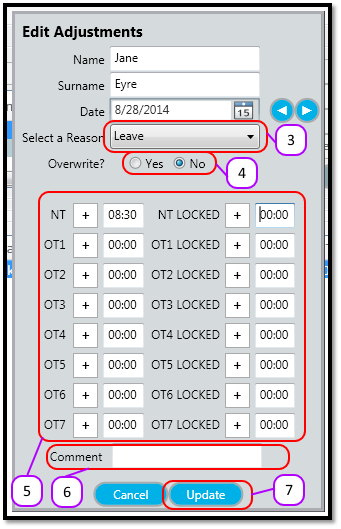
- Select the Adjustment Reason. (See Figure 2)
- Optional: Edit the Overwrite option. If you select Yes, then the employees clocking transactions for that day will be ignored and the adjustment will overwrite any hours the employee worked. If you select No, then the adjustment of hours will be added to the hours the employee worked. (See Figure 2)
- Optional: Edit the adjustment hours. These hours will appear on the timesheet in the respective columns. (See Figure 2)
- Optional: Edit the comment. (See Figure 2)
- Click the Update (See Figure 2)
Figure 1
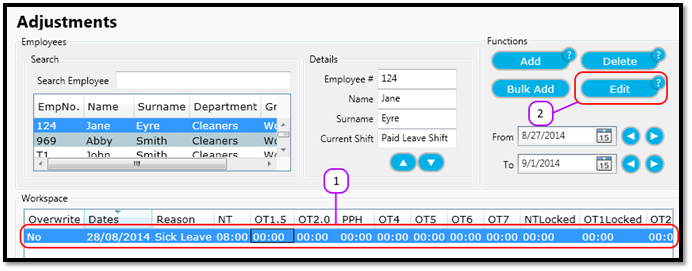
Figure 2
Comments
0 comments
Please sign in to leave a comment.