
In Messenger, the excel export is actually a .csv (Comma Separated Value) file. It contains the Timesheet information between the selected dates and for the selected employees.
Here is an example of the A-Pay Export. Please note that the hours are in decimal format. This means that 10 hours and 45 minutes will be 10.75
Figure 1
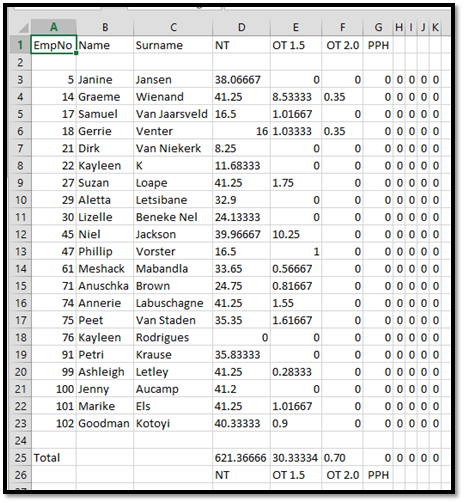
The columns are as follows:
- The employee’s Payroll ID (as entered on Messenger)
- The employee’s first name (as entered on Messenger)
- The employee’s surname (as entered on Messenger)
- Total of Timesheet Column 1 (in decimal)
- Total of Timesheet Column 2 (in decimal)
- Total of Timesheet Column 3 (in decimal)
- Total of Timesheet Column 4 (in decimal)
- Total of Timesheet Column 5 (in decimal)
- Total of Timesheet Column 6 (in decimal)
- Total of Timesheet Column 7 (in decimal)
- Total of Timesheet Column 8 (in decimal)
The rows are as follows:
- Header row containing column headings
- Blank row
- Listing of the employees on the timesheet
- Blank row
- The Total timesheet hours per column for all employees
- Footer row with timesheet column names
Comments
0 comments
Please sign in to leave a comment.