
In Messenger, the excel export is actually a .csv (Comma Separated Value) file. It contains the Timesheet information between the selected dates and for the selected employees.
Here is an example of the Prizm Export. Please note that the hours are in decimal format. This means that 10 hours and 45 minutes will be 10.75
Figure 1
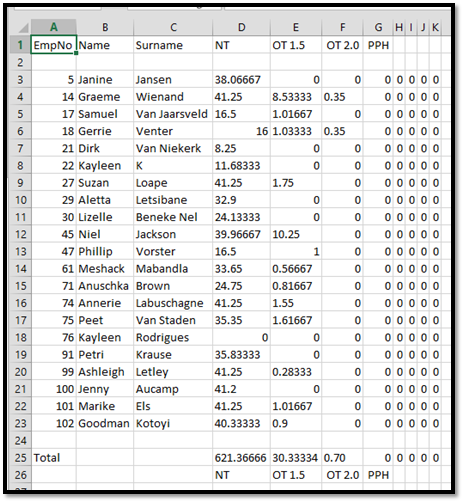
The columns are as follows:
- The employee’s Payroll ID (as entered on Messenger)
- The employee’s first name (as entered on Messenger)
- The employee’s surname (as entered on Messenger)
- Total of Timesheet Column 1 (in decimal)
- Total of Timesheet Column 2 (in decimal)
- Total of Timesheet Column 3 (in decimal)
- Total of Timesheet Column 4 (in decimal)
- Total of Timesheet Column 5 (in decimal)
- Total of Timesheet Column 6 (in decimal)
- Total of Timesheet Column 7 (in decimal)
- Total of Timesheet Column 8 (in decimal)
The rows are as follows:
- Header row containing column headings
- Blank row
- Listing of the employees on the timesheet
- Blank row
- The Total timesheet hours per column for all employees
- Footer row with timesheet column names
Comments
0 comments
Please sign in to leave a comment.