
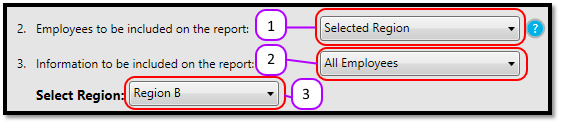
- Select Selected Region from the Employees to be included on the report drop down. (See Figure 1)
- Pick which information is to be included on the report by selecting an option from the Information to be included on the report drop down. Your options are:
- All Employees
- Single Employee
- Departments
- Groups
- Departments and Groups
Please Note: this allows you to choose the regional information for a single employee, or for all employees in a department/group. (See Figure 1)
- Select the Region from the Select Region drop down list. (See Figure 1)
- Continue drawing the report as normal.
Figure 1
Comments
0 comments
Please sign in to leave a comment.