
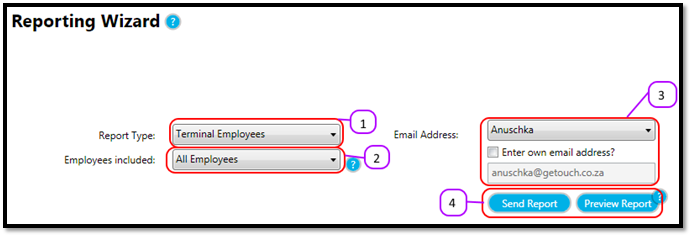
- Select the Terminal Employees report from the Report Type drop down. (see figure 1)
- Select the employees you want to include on the report from the Employees included drop down. (see figure 1) The options for the Terminal Employees report are:
- All Employees
- Selected Terminal
- Select your Email Address from the Email Address drop down. Or click the Enter own email address checkbox and type the email address you want to send the report to in the Email Address text box. (see figure 1)
- Click the Send Report button to send the report to your mailbox or click on Preview Report to display the report on-screen. (see figure 1)
Figure 1
Comments
0 comments
Please sign in to leave a comment.