
The Wages screen is only available to clients who have paid for the wages feature.
The Wages screen is where the client can request pay slips and handle the wages of the employee.
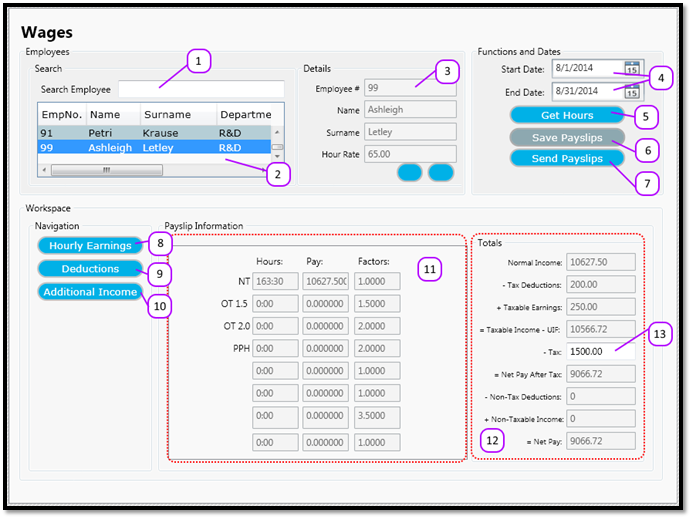
The Wages screen consists of the following (see Figure 1):
- Search for an employee
- List of all employees
- Some of the selected employee’s details, including their hourly pay rate or salary.
- Starting and Ending date of the pay slip.
- A button used to calculate all the employees hours.
- A button used to save the employee pay slip information.
- A button used to send the pay slips to your email address.
- Switches the area at point 11 to show the Hourly Earnings of the employee
- Switches the area at point 11 to show the Deductions of the employee
- Switches the area at point 11 to show the Additional Income of the employee
- The area that shows the pay slip information depending on the selection made at points 8 – 10.
- Shows the pay slip calculations
- The place where you enter the employee’s tax deduction.
Figure 1
Comments
0 comments
Please sign in to leave a comment.