
In Messenger, the Abacus export is actually a .csv (comma separated value) file, with a | (pipe) as the value separator. It contains the Timesheet information between the selected dates and for the selected employees. This file can be imported into Abacus.
Here is an example of the Abacus Export
Figure 1
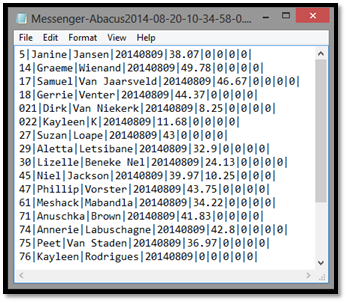
The format of the row is as follows:
|
Column |
Details |
Example |
|
1 |
Employee Number |
5 |
|
2 |
Employee’s First Name |
Janine |
|
3 |
Employee’s Surname |
Jansen |
|
4 |
End date of export |
20140809 |
|
5 – 9 |
Hours as a decimal value (column 1 - 5) |
38.07 |
The hours are in a decimal format, so therefore 10 hours and 45 minutes will be shown as 10.75
Comments
0 comments
Please sign in to leave a comment.