
- Select the additional income from the Additional Income (see Figure 1)
- Optional: Edit the additional income’s Description. (see Figure 1)
- Optional: Edit the additional income’s Default Amount. (see Figure 1)
- Optional: Edit the Taxable text box. (see Figure 1)
- Click Update to save the changes. (see Figure 1)
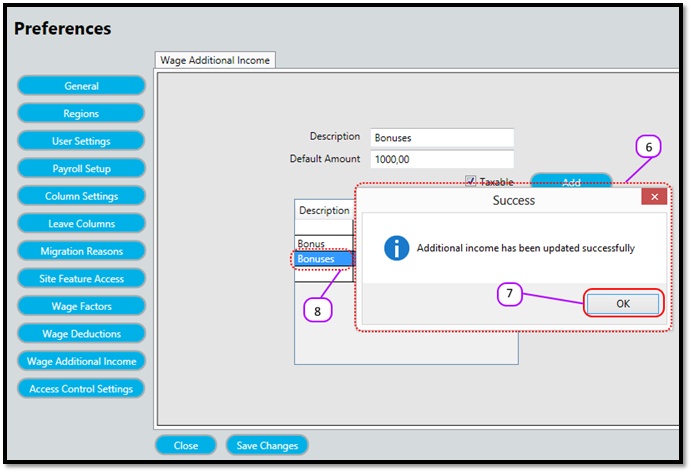
- Notice a message box pops up to let you know the update was successful. (see Figure 2)
- Click the OK (see Figure 2)
- Notice that the additional income description is updated in the Additional Income (see Figure 2)
Figure 1
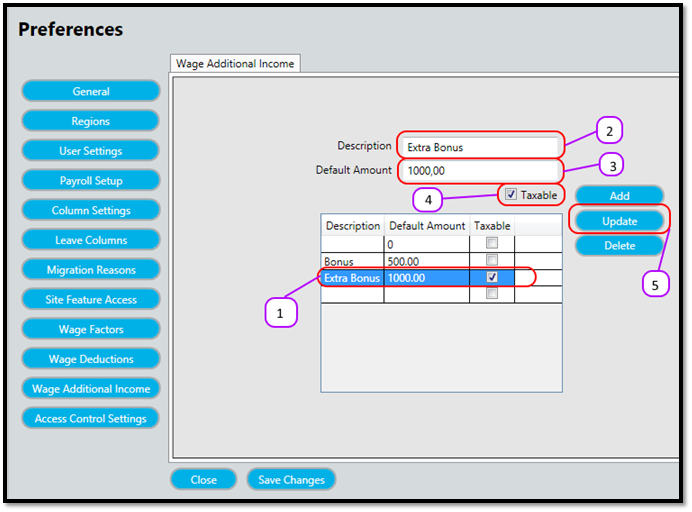
Figure 2
Comments
0 comments
Please sign in to leave a comment.