
- Select the deduction from the Deductions (see Figure 1)
- Optional: Edit the deduction’s Description. (see Figure 1)
- Optional: Edit the deduction’s Default Amount. (see Figure 1)
- Optional: Edit the Tax Deduction text box. (see Figure 1)
- Click Update to save the changes. (see Figure 1)
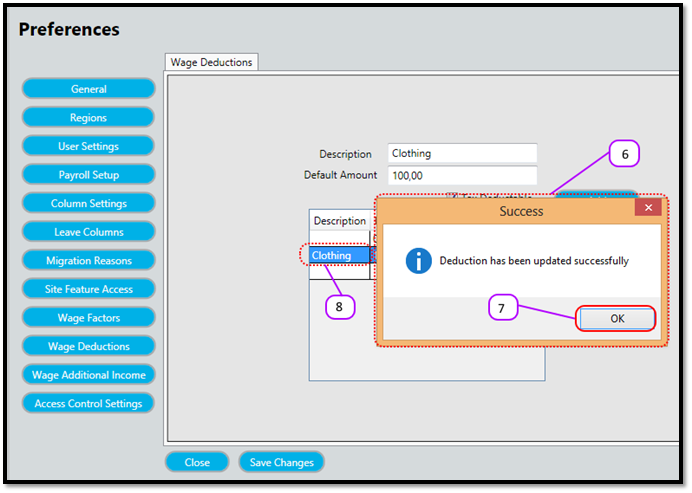
- Notice a message box pops up to let you know the update was successful. (see Figure 2)
- Click the OK (see Figure 2)
- Notice that the deduction description is updated in the Deductions (see Figure 2)
Figure 1
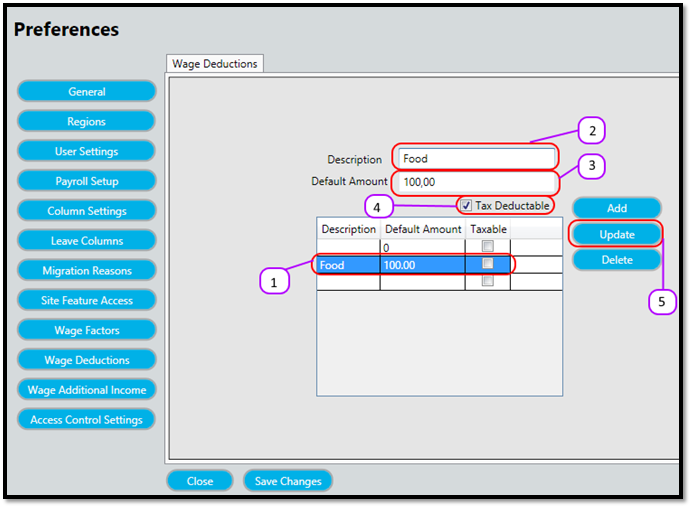
Figure 2
Comments
0 comments
Please sign in to leave a comment.