
In Messenger, the VIP Classic Export is an .ASC (Ascii) file. It contains the Timesheet information between the selected dates and for the selected employees.
Please note that VIP can only import 6 columns at a time. You will need to make use of layout codes in order to import all 8 of Messenger’s columns.
Here is an example of the VIP Classic Export
Figure 1
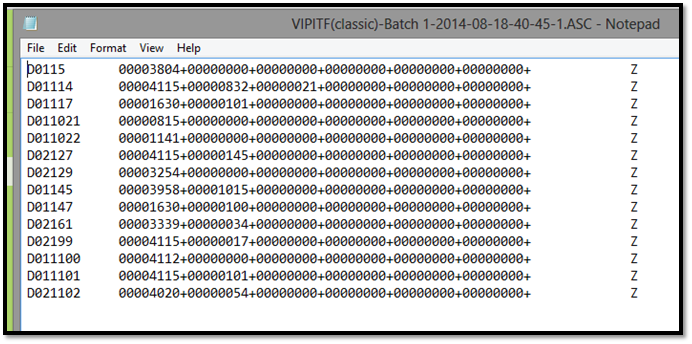
The format is as follows:
|
Character Number |
What it is |
Example |
|
1 |
D |
D |
|
2 until 3 |
Cost Code |
01 |
|
4 |
Layout Code |
1 |
|
5 until 12 |
Employee Number |
101 |
|
13 until 18 |
Hours Worked (column 1) |
000038 |
|
19 until 20 |
Minutes Worked (column 1) |
04 |
|
21 |
Add or Subtract Hours |
+ |
|
22 until 27 |
Hours Worked (column 2) |
000038 |
|
28 until 29 |
Minutes Worked (column 2) |
04 |
|
30 |
Add or Subtract Hours |
+ |
|
31 until 36 |
Hours Worked (column 3) |
000038 |
|
37 until 38 |
Minutes Worked (column 3) |
04 |
|
39 |
Add or Subtract Hours |
+ |
|
40 until 45 |
Hours Worked (column 4) |
000038 |
|
46 until 47 |
Minutes Worked (column 4) |
04 |
|
48 |
Add or Subtract Hours |
+ |
|
49 until 54 |
Hours Worked (column 5) |
000038 |
|
55 until 56 |
Minutes Worked (column 5) |
04 |
|
57 |
Add or Subtract Hours |
+ |
|
58 until 63 |
Hours Worked (column 6) |
000038 |
|
64 until 65 |
Minutes Worked (column 6) |
04 |
|
66 |
Add or Subtract Hours |
+ |
|
67 until 80 |
Fill up with blanks, end with Z |
Z |
Comments
0 comments
Please sign in to leave a comment.