
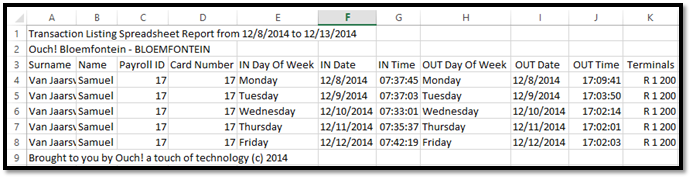
The Excel Transaction Listing report shows a list of all the in and out clockings for each employee. It also shows which Ouch! terminal the transaction was made on, or if it was manually added on Messenger.
The columns of the report are as follows:
- Surname of Employee
- Name of Employee
- Payroll ID (Employee Number)
- Card Number (Number on clock)
- IN Day of Week
- In clocking date
- In clocking time
- OUT Day of week
- Out clocking date
- Out clocking time
- Terminal on which the employee clocked or “Messenger” if the transaction was added on the Messenger site.
See screenshot below for an example of the Excel Transaction Listing report.
Figure 1
Comments
0 comments
Please sign in to leave a comment.