
Multi Periods allow different monthly minimums and maximums to be set for each month. The Enable Multi Periods check box on the Preferences General tab must be ticked for Multi Periods to work. You will also use the Monthly tab to create the Multi Period information for each month of the year.
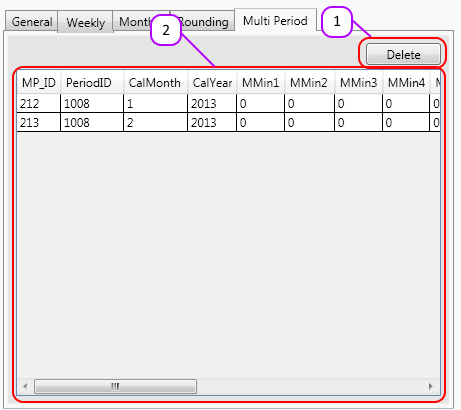
The Multi Periods tab consists of:
- Delete button, used to delete multi periods.
- Data Grid containing a list of all the multi periods.
How do Multi Periods work?
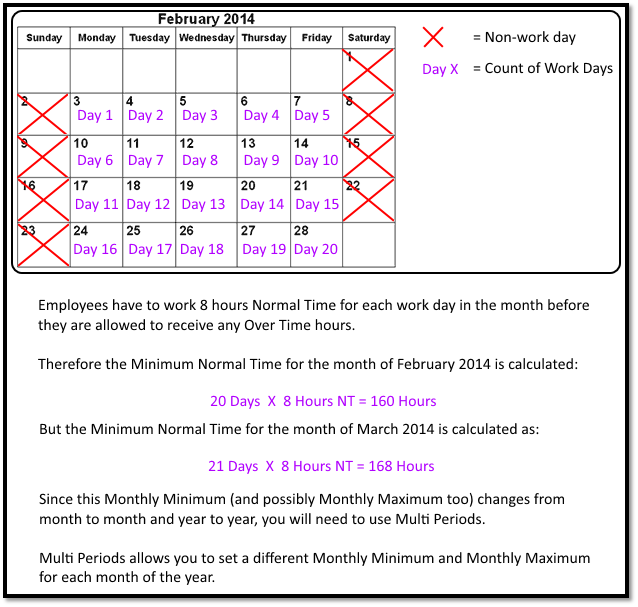
Please see Figure 1 for an example of how multi periods work.
Figure 1
How to create a Multi Period
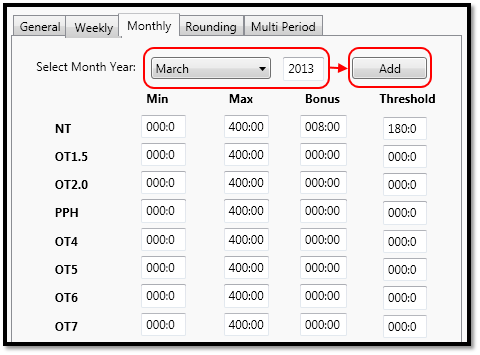
On the Monthly tab, you will enter the minimums, maximums, bonus and threshold for the month (see the help file on the Monthly tab for more details).
Select the month that you want the monthly setup to apply to. Enter the year in the text box. Click the Add button. (see Figure 2)
The Multi Period will appear in the Data Grid on the Multi Period tab.
Figure 2
Comments
0 comments
Please sign in to leave a comment.